/ How-to
How to export your PokerStars hand history
PokerStars doesn't save hand histories by default - you turn it on once in the client settings. After that, files pile up in a folder on their own, nothing to download manually.
- 1Open the PokerStars client and sign in.
- 2In the top menu open "Settings".
- 3On the left pick "Playing History" → "Hand History".
- 4Tick "Save My Hand History" - without it the files aren't written.
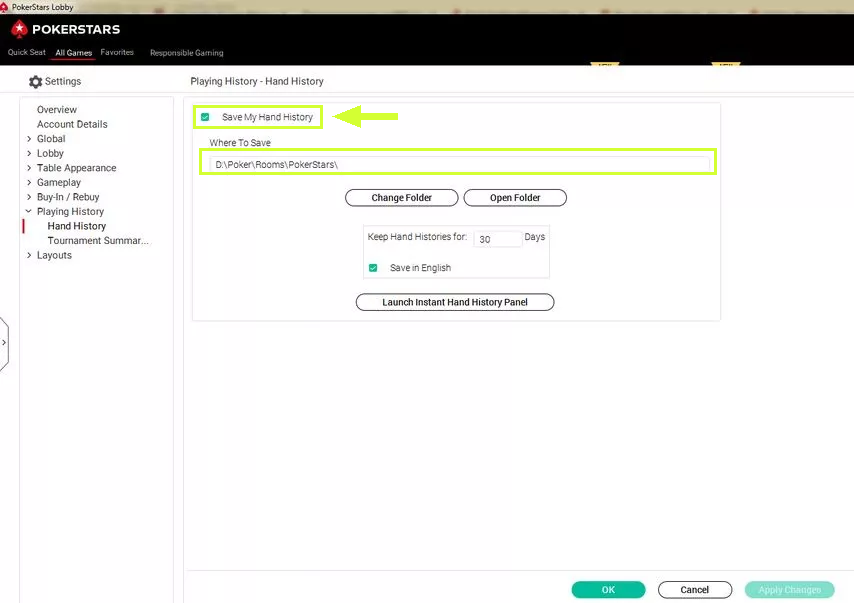
- 5Right there, the "Where To Save" field shows the folder with the files. Note it down (or click "Change Folder" and pick a convenient one).
- 6Open that folder on your computer and grab the tournament .txt files you need.
Folder with the files
The path is shown in "Where To Save" in the same settings
You upload: .txt
Want to see the hand right at the table - enable "Instant Hand History" in the table menu ("Table"). The history language doesn't matter, we read any.
Playing on other rooms too - all the guides are here
Found the files - upload a tournament, the first review is free.
Upload a tournament